
- 56lessons
- 3guided projects
- 9module checkpoints
- 2.8hours of video
What you'll learn
- Create and organise a Blueprint-only Unreal project in a recorded engine version and set the map the packaged game starts in.
- Read and write Blueprint graphs: events, flow control, functions, references, casts, interfaces, dispatchers and Print String debugging.
- Predict and verify Block, Overlap and Ignore collision outcomes, overlap and hit events, line traces and physics impulses.
- Place data in Game Mode and Game State, model legal game phases, and show state in UMG widgets and menus with correct input modes.
- Test the prototype with a written plan, documented Automation runs, telemetry logs and a structured playtest, and verify fixes with evidence.
Skills you'll gain
- Editor
- assets
- Actors
- components
- Blueprint execution
- Input
- movement
- Collision
- physics
- behavior basics
- Game state
- Lighting
- packaging
- Prototype playtesting
Tools you'll use
- Unreal Editor
- Blueprints
- Enhanced Input
- Output Log (Print String)
Details to know
- Certificate on completionIssued after your final project is reviewed
- 9 module checkpointsA quiz and a practical task close each module
- Self-pacedStudy any time; your progress is saved
How every lesson works
Each lesson follows the same four steps, so you always know what comes next.
- 01
Watch & Learn
A short animated video explains one idea at a time.
- 02
Guided Practice
Work through an example step by step and check the result.
- 03
Quiz & Challenge
Short questions check the idea has landed before you move on.
- 04
Mini Project
Build something useful from a project brief.
Learn at your own pace
This is a self-paced course. There are no live classes and no fixed timetable.
- Start any timeStudy when it suits you. Lessons are short, so they fit around work or college.
- Pick up where you left offYour progress is saved to your account.
- Ask when you're stuckUse Ask Mentor inside the learning platform.
Your path in 4 phases
Each phase ends with something you have built and checked.
- 01
Modules 1 to 3
Editor and assets to Blueprint execution
Set up a pinned Unreal project, move around the level editor, organise imported assets and set the map the game starts in.
You build: Guided project “Lantern arena with scored pickups”: Pinned project, map, markers and asset tree; BP_Lantern with variables, spawn and a switch-and-door graph with logs.
- 02
Modules 4 to 6
Input and movement to AI and behavior basics
Drive a character with Enhanced Input: actions, mapping contexts, modifiers, triggers, camera and context switching, verified with debug output.
You build: Guided project “Playable character with a patrolling guard”: Third-person character with WASD, charge and pickup collisions.
- 03
Modules 7 to 8
Game state and UI to Lighting and packaging
Place session rules and shared state in the Game Mode and Game State, model legal states, and show them through UMG widgets and menus with correct input modes.
You build: Guided project “Stateful HUD and packaged build”: Game Mode, Game State, phases and HUD with pause menu; Lit level and a packaged build opening on Lantern_Main.
- 04
Module 9
Prototype playtesting
Test the prototype with documented automation runs, instrumented logs, structured playtests and a packaged smoke test, then fix and re-verify what the evidence shows.
You build: Final project build and trainer-reviewed demonstration (see project).
Full curriculum
9 modules and 56 lessons, 31 to 52 hours of study
01Editor and assets6 lessons, 3 to 4 hours
Lessons
- Matching your machine and a pinned engine version to Epic's published specifications
- Creating a project from a template and reading what the project contains
- Moving through the level editor and reading an Actor's Transform in the Details panel
- Importing and organising assets with a naming and folder convention
- Assigning a material to a mesh slot and replacing the material without touching the mesh
- Saving levels and setting the Game Default Map before anything else is built
After this module you can
- Compare your machine with the hardware list on Epic's specifications page and record a pinned engine version with the date you checked.
- Create a Blueprint-only project from a template, name its map, and list the project file, Content folder and map file you can see on disk.
- Save a level, set it as the Game Default Map in Project Settings, and explain why a missing default produces a black screen in a packaged game.
02Actors and components6 lessons, 3 to 4 hours
Lessons
- An Actor as a container whose transform comes from its root component
- Choosing Actor, Scene or Primitive components for a job
- Attachment: building a parent-child hierarchy with relative transforms
- Creating a Blueprint Actor class and editing its Class Defaults
- Blueprint variables: types, Instance Editable and Class Defaults
- Spawning Actors and Destroy with Expose on Spawn
After this module you can
- Explain from a screenshot why moving an Actor moves its root component and demonstrate it by changing the root's transform.
- Classify five parts of a planned object as Actor Component, Scene Component or Primitive Component and justify each choice.
- Spawn an Actor from a class at a given transform with a value set on spawn, then destroy it.
03Blueprint execution7 lessons, 3 to 5 hours
Lessons
- Execution pins versus data pins: reading a graph in the order it runs
- Events: Begin Play, Tick and custom events
- Branch, Sequence and flow control nodes
- Functions, macros and local variables
- Direct references and Cast nodes between Blueprints
- Blueprint Interfaces and Event Dispatchers for decoupled communication
- Debugging Blueprints with Print String tags, breakpoints and watch values
After this module you can
- Trace a graph by hand and predict its Output Log lines before running it.
- Use Begin Play, Tick and a custom event in the same Blueprint and explain when each runs.
- Find a seeded bug in a graph using Print String tags and a breakpoint and record the fix.
04Input and movement7 lessons, 3 to 5 hours
Lessons
- Input Actions and their value types: Boolean, Axis1D and Axis2D
- Input Mapping Contexts: tying keys to actions and adding the context at runtime
- Building WASD for an Axis2D action with Swizzle and Negate modifiers
- Trigger states: Started, Ongoing, Triggered, Completed and Canceled
- Moving a Character with Add Movement Input and speed settings
- A third-person camera with a spring arm and controller rotation
- Switching mapping contexts by priority and debugging input
After this module you can
- Create Input Actions with the right value type for each capability and listen to them in a Blueprint.
- Create an Input Mapping Context, map keys to actions and add it at Begin Play.
- Add and remove contexts to switch between On Foot and Menu input and use the documented debug commands.
05Collision and physics6 lessons, 3 to 4 hours
Lessons
- Object Types and the three responses: Block, Overlap and Ignore
- Overlap events: Generate Overlap Events on both Actors
- Hit events: blocking collisions and Simulation Generates Hit Events
- Line traces and trace responses
- Simulate Physics, mass and impulses on a crate
- A collectible lantern: overlap, score and Destroy
After this module you can
- Predict whether two Actors block, overlap or pass through each other from their settings and verify it in play.
- Trigger an overlap event and print the Other Actor's name only when both Actors are set correctly.
- Combine overlap, a cast to the player and Destroy to build a collectible that adds to the score once.
06AI and behavior basics5 lessons, 2 to 4 hours
Lessons
- Pawn, Controller and possession: who decides what a character does
- Blackboard keys as the AI's memory
- A Behavior Tree asset: which branch runs and why
- Navigation for AI movement: a nav mesh volume and moving to a location
- Patrol and chase decisions driven by a Blackboard key
After this module you can
- Explain and demonstrate that a Controller possesses a Pawn, and name which Controller drives which Pawn in your level.
- Create a Blackboard with typed keys and set and read values from the AI Controller.
- Switch a guard between patrol and chase using a Boolean key, and verify each decision from tagged logs.
07Game state and UI7 lessons, 3 to 5 hours
Lessons
- Gameplay framework roles: Game Mode, Game State, Player State, Controller and HUD
- Setting Game Mode defaults per level through World Settings
- Game phases with an enum and legal transitions
- Widget Blueprints: the Designer layout and the Graph logic
- Create Widget and Add to Viewport, and keeping a reference
- Updating the HUD from game state with a dispatcher instead of polling
- Menus, pause and input modes
After this module you can
- Place each piece of Lantern Run data and logic in the right framework class and justify the choice.
- Create a Game Mode Blueprint, set its default Pawn and Game State, and override it for one level in World Settings.
- Show a pause menu that takes UI input, pause the game and restore gameplay input on resume.
08Lighting and packaging6 lessons, 3 to 4 hours
Lessons
- Light actors and light mobility: choosing what moves and what does not
- Environment lighting: sky, atmosphere and the level's overall look
- Global illumination with Lumen: what to read and what to record
- Build configurations: Debug, DebugGame, Development, Test and Shipping
- Packaging settings: Game Default Map, build configuration and the black-screen check
- Package Project and inspecting the staging output
After this module you can
- Place point, spot and directional lights in a level and justify each light's mobility choice in writing.
- Light a level with sky and directional light, and record how the sun angle changes shadows and glow readability.
- Package for your desktop platform and list what the staging folder contains.
09Prototype playtesting6 lessons, 3 to 4 hours
Lessons
- A test plan derived from the game's states and rules
- Running Automation tests from the editor's Test Automation tool
- Running Automation from the command line with -ExecCmds and a report path
- Telemetry through tagged Print String lines and log filtering
- Structured playtests on the packaged build and a defect list
- Fix, regress and demonstrate: closing the loop on two defects
After this module you can
- Write ten checks, each with a trigger, an expected value and the evidence that proves it.
- Enable a test plugin, run selected tests in the Automation tab and read the results.
- Fix two defects, re-run the relevant checks and demonstrate the finished prototype.
What you'll build
3 guided projects along the way, then a final project.
Lantern arena with scored pickups
after module 3Playable character with a patrolling guard
after module 6Stateful HUD and packaged build
after module 8
Final project
Playable Unreal prototype with Blueprint interactions and tested game states. Choose one option: Lantern Run; Key and Gate Courtyard; Switch Garden.
What you submit
Source and artifact submission: the project's Content assets shared per trainer instructions, plus the packaged build folder and a README naming the pinned engine version and build configuration.
How it's reviewed
Trainer review against the rubric: Each criterion is scored not met / partly met / met by the trainer: states and rules work as specified Blueprints are readable and named collision and input behave as predicted AI decisions are visible in logs.
Where you'll use it
- Prototype a collect-and-escape level with pickups, a patrolling guard and a HUD.
- Package a build and run a playtest to check game states and win/lose conditions.
Roles that use these skills
- Game designer
- Unreal developer
- Technical designer
Earn the certificate by building, not watching
- Complete the lessons and pass each module checkpoint.
- Build your final project and demonstrate it.
- OUTLEARN reviews your project and issues your certificate. It is not issued automatically.
Related courses
Take first
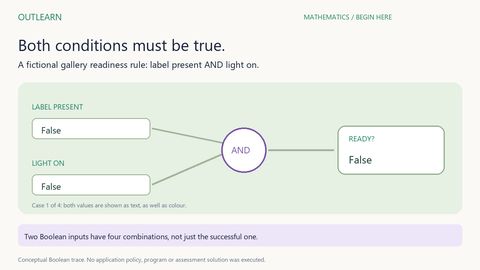
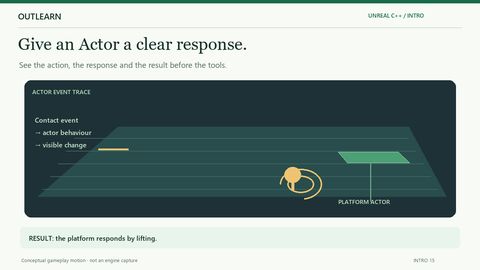
Where this leads
This course is part of the Unreal Game Developer bundle: 3 courses for ₹999, against ₹1,297 bought one by one.
Frequently asked questions
What do I need before I start?
Prerequisite courses: Mathematics for Programmers: Discrete and Applied Foundations. Prerequisite course the earlier course (Mathematics for Programmers) gives the vector and coordinate reasoning used for locations, directions and distances; no prior Unreal, C++ or game-engine experience is assumed, but the learner needs comfortable logical thinking (conditions, variables, functions), a capable Windows, macOS or Linux machine with large free disk space, and the ability to install and run the Epic Games launcher and editor. Accepted equivalents for the earlier course: being able to add and subtract 3D vectors, compute a distance between two points and explain a unit conversion. There is no student sandbox: all work happens on the learner's own machine, so learners without suitable hardware must tell the trainer before starting, and Epic's launcher, licence and royalty terms must be read from Epic's current pages (verify current terms).
Do I get a certificate?
We do not issue certificates until you successfully build and demonstrate your live project. Module and final assessments are planned; the module pass rule is proposed, not final. Certificates are issued by OUTLEARN staff; nothing is issued automatically.
Where do the labs run?
Local Unreal Editor on the learner's own capable Windows, macOS or Linux machine; Blueprint-only project; evidence is screenshots with stated values plus Output Log text produced by Print String; no hosted sandbox or LMS-run editor is assumed.
Be first in when Unreal Engine and Blueprints opens
Email us and we will tell you as soon as enrolment opens.
Notify me when it opens