
- 40lessons
- 3guided projects
- 8module checkpoints
- 1.7hours of video
What you'll learn
- Secure a new AWS account and reason about IAM policy decisions, roles and temporary credentials.
- Choose among EC2, container services and Lambda, and reason about load balancing and Auto Scaling.
- Place and recover Amazon RDS databases, and separate Multi-AZ from read replicas.
- Read CloudWatch metrics, design alarms, structure logs and use CloudTrail to answer who changed what.
- Deliver a bounded AWS sandbox stack with identity, cost and cleanup evidence.
Skills you'll gain
- Accounts
- IAM
- Networking
- Compute
- Object storage
- Managed databases
- Monitoring
- Reliability
- costs
- AWS lab
Tools you'll use
- AWS IAM
- Amazon VPC
- Amazon EC2
- AWS Lambda
- Amazon S3
- Amazon RDS
- Amazon CloudWatch
- AWS CloudTrail
Details to know
- Certificate on completionIssued after your final project is reviewed
- 8 module checkpointsA quiz and a practical task close each module
- Self-pacedStudy any time; your progress is saved
How every lesson works
Each lesson follows the same four steps, so you always know what comes next.
- 01
Watch & Learn
A short animated video explains one idea at a time.
- 02
Guided Practice
Work through an example step by step and check the result.
- 03
Quiz & Challenge
Short questions check the idea has landed before you move on.
- 04
Mini Project
Build something useful from a project brief.
Learn at your own pace
This is a self-paced course. There are no live classes and no fixed timetable.
- Start any timeStudy when it suits you. Lessons are short, so they fit around work or college.
- Pick up where you left offYour progress is saved to your account.
- Ask when you're stuckUse Ask Mentor inside the learning platform.
Your path in 4 phases
Each phase ends with something you have built and checked.
- 01
Modules 1 to 2
Locked-down account and private network design
Secure a new AWS account, read and predict IAM policy decisions, use roles with temporary credentials, and verify identity and activity.
You build: Locked-down account and private network design: Account lockdown checklist and a narrow read policy with a request table.
- 02
Modules 3 to 5
Storage, compute and recovery pack
Covers Compute, Object storage and Managed databases.
You build: Storage, compute and recovery pack: Stateless handler tested locally and a key scheme with prefix listing proof.
- 03
Modules 6 to 7
Observable and costed lab design
Read CloudWatch metrics and dimensions, design alarms with sound periods and actions, turn structured logs into queries and metrics, use CloudTrail to answer who changed what, and write a monitoring runbook.
You build: Observable and costed lab design: Alarm definitions with predicted state sequences and a structured log format Monitoring runbook and a recovery-objective table.
- 04
Module 8
Bounded AWS sandbox deployment with identity, costs and cleanup evidence
Plan, secure, describe, verify, break, recover and tear down a bounded AWS sandbox stack, producing identity, cost and cleanup evidence either as a local proof pack or in an authorised sandbox account.
You build: The final project, demonstrated to a trainer.
Full curriculum
8 modules and 40 lessons, 24 to 41 hours of study
01Accounts and IAM5 lessons, 2 to 4 hours
Lessons
- Root user, shared account email and the first-day lockdown order
- Reading an identity-based policy: Effect, Action, Resource and ARNs
- Policy evaluation: implicit deny, explicit deny, boundaries and SCP intersection
- Roles, trust policies and temporary credentials
- Proving who you are and what happened: caller identity, policy simulation and CloudTrail history
After this module you can
- Order the first-day account steps (root MFA, group-managed email, no root access keys, budget alert, non-root admin identity) and justify why each comes before any resource is created.
- Read a JSON identity-based policy and predict allowed or denied for five sample requests, distinguishing a bucket ARN from an object ARN.
- Use the identity-check, policy-simulation and event-history tools to diagnose an access denied report without guessing.
02Networking5 lessons, 2 to 4 hours
Lessons
- Regions, Availability Zones and a non-overlapping VPC address plan
- Route tables and the internet gateway: what makes a subnet public
- Security groups as stateful allow-lists, and how network ACLs differ
- Private workloads: NAT gateway, outbound-only access and VPC endpoints
- Diagnosing 'cannot connect': route, security group, network ACL, listener and flow logs
After this module you can
- Produce a VPC CIDR and per-Availability-Zone subnet plan with no overlaps, and state which AWS scope (account, Region, Availability Zone) each networking object lives in.
- Classify five subnets as public or private by reading their route tables, and state the two things an instance needs to be reachable from the internet.
- Apply an ordered checklist to four fictional failure reports and name the failing layer from the symptom and evidence given.
03Compute5 lessons, 2 to 4 hours
Lessons
- Choosing EC2, a container service or Lambda by workload shape
- EC2 anatomy: AMI, instance type, EBS volumes and instance store
- Launching safely: dry-run, tags, instance roles and stop versus terminate
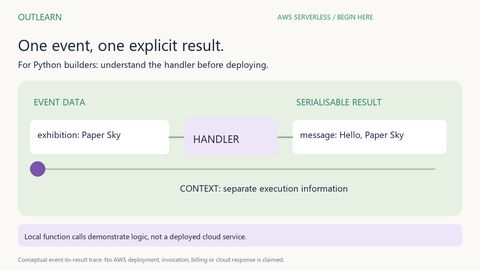
- Lambda: handler, event, stateless execution and the execution role
- Load balancer plus Auto Scaling group: min, desired, max and health checks
After this module you can
- Choose among EC2, a container service and Lambda for five described workloads and defend each choice with duration, state, startup and operating-system ownership.
- Describe what an AMI, an instance type, an EBS volume and an instance store volume each contribute, and predict what data survives stop and terminate.
- Simulate an Auto Scaling group with min, desired and max capacity behind a load balancer and predict the group's size after failures and scaling requests.
04Object storage5 lessons, 2 to 4 hours
Lessons
- Buckets, object keys and why a prefix is a name rather than a folder
- Private by default: Block Public Access, bucket policies, IAM and disabled ACLs
- Versioning: overwrites, delete markers and recovery
- Lifecycle rules and storage classes, reasoned without prices
- Consistency and concurrent writers: read-after-write, last writer wins and no cross-key atomicity
After this module you can
- Explain bucket, object and key, and show with a local model that a key containing slashes is one flat name that tools group by prefix and delimiter.
- Decide which access mechanism (identity policy, bucket policy, access point, ACL) fits four situations and keep Block Public Access on unless a documented need exists.
- Predict the results of reads after writes and concurrent writes to one key, and design around the lack of cross-key atomic updates.
05Managed databases5 lessons, 2 to 4 hours
Lessons
- What RDS operates for you and what stays yours
- Placing a database privately: subnets, security group chain and no public access
- Backups, snapshots, point-in-time restore and what deletion removes
- Multi-AZ for availability versus read replicas for read scaling
- Choosing a database service by access pattern and the idle-cost trap
After this module you can
- Fill a responsibility matrix for on-premises, EC2-hosted and RDS databases and name three tasks that remain the customer's even on RDS.
- Design a network placement for a database that only one application tier may reach, using private subnets across two Availability Zones and a security group that names the application tier's group.
- Pick a relational, key-value or other managed database for four access patterns and list the always-on cost and teardown items for the chosen option.
06Monitoring5 lessons, 2 to 4 hours
Lessons
- CloudWatch metrics: namespaces, dimensions, statistics and periods
- Alarms: states, periods, missing data and notification actions
- Logs as data: structured events, Logs Insights-style queries and metric filters
- CloudTrail: who did what, event history and trails
- Dashboards and a monitoring runbook that links alarms to first checks
After this module you can
- Identify the namespace, metric name and dimensions of a metric, choose a statistic and period for a question, and explain which dimension combinations you can query.
- Define an alarm with a threshold, period and evaluation periods, predict its state over a data series, and explain when its action fires.
- Produce a one-page runbook that maps each alarm to a first check, an owner and a verification step, and use a composite alarm idea to reduce noise.
07Reliability and costs5 lessons, 2 to 4 hours
Lessons
- Failure domains on AWS and availability arithmetic for serial and redundant components
- Recovery objectives (RTO and RPO) mapped to AWS backups and placement
- AWS cost drivers that surprise beginners, read from bill lines
- Cost visibility and guardrails: budgets, tags, Cost Explorer and Free Tier tracking
- Well-Architected review: reliability and cost trade-offs of a design
After this module you can
- Compute the combined availability of serial and redundant components and state whether a single-zone, multi-zone or multi-Region placement survives a given outage.
- Choose backup, replication and placement settings for a stack from stated RTO and RPO values and show whether a given backup schedule can meet them.
- Review a small AWS design against the six Well-Architected pillars and record one risk and one improvement for reliability and cost, naming the extra resources each improvement adds.
08AWS lab5 lessons, 2 to 4 hours
Lessons
- Lab charter, budget gate and architecture decision record for the sandbox stack
- A least-privilege identity set for the lab: deployer, workload role and a decision table
- Template and pre-deploy gate: describing the stack declaratively and checking it first
- Deploy, verify, break and recover: denied access, restored object and alarm evidence
- Cost report, teardown and the empty residual listing
After this module you can
- Write a one-page lab charter and architecture decision record that fix the scope, Region, tags, budget gate and teardown promise before any resource exists.
- Define a deployer identity and a workload role with narrow policies for the capstone stack and prove their decisions with a request table.
- Complete the capstone with a cost-driver report, a labelled teardown and an empty residual listing that proves nothing billable remains.
What you'll build
3 guided projects along the way, then a final project.
Locked-down account and private network design
after module 2Storage, compute and recovery pack
after module 5Observable and costed lab design
after module 7
Final project
Bounded AWS sandbox deployment with identity, costs and cleanup evidence. Options: Versioned document-intake stack; Scheduled report archive; Audit-friendly configuration vault.
What you submit
Source and artifact submission: charter, decision record, identity policies, template, lint reports, drill evidence, cost report and teardown evidence.
How it's reviewed
Trainer review against a weighted rubric: Safety gate before resources (budget, tags, non-root identity): 20 percent Least-privilege identity set and decision table: 20 percent Functional and failure drills with observable evidence: 25 percent.
Where you'll use it
- Review an IAM policy and predict whether a request will be allowed or denied before granting access.
- Set a budget alert and tag plan for a new workload, then confirm everything is removed at teardown.
Roles that use these skills
- Cloud support engineer
- Junior cloud engineer
- DevOps engineer
Earn the certificate by building, not watching
- Complete the lessons and pass each module checkpoint.
- Build your final project and demonstrate it.
- OUTLEARN reviews your project and issues your certificate. It is not issued automatically.
Related courses
Take first
Where this leads
Frequently asked questions
What should I know before starting?
The course expects Cloud Computing Fundamentals or an accepted equivalent. Prerequisite Cloud Computing Fundamentals. A short diagnostic check is described in the entry requirements.
What do I build for the final project?
You choose one of 3 options: Versioned document-intake stack; Scheduled report archive; Audit-friendly configuration vault. It is reviewed by a trainer in a live demonstration.
When do I get a certificate?
Only after you build and demonstrate your live project. OUTLEARN staff issue certificates; nothing is issued automatically.
Be first in when AWS Fundamentals opens
Email us and we will tell you as soon as enrolment opens.
Notify me when it opens